Tuesday, September 29, 2020

Wednesday, September 2, 2020
Two way SSL testing in SOAP UI
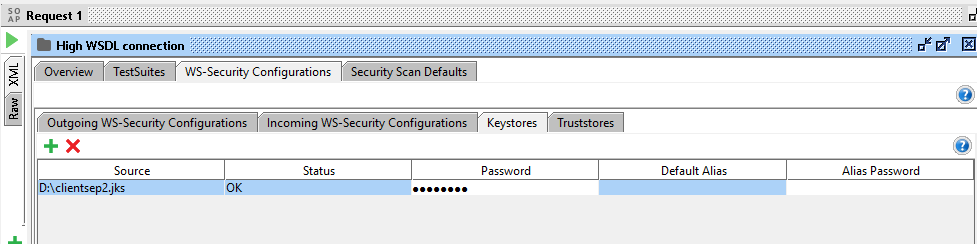
Caused by: java.security.UnrecoverableKeyException: Cannot recover key
for this error if you are trying in standalone java program keep the storepassword and keypassword same
and set the java system properties
import java.net.URL;
import java.net.URLConnection;
import java.util.Iterator;
import javax.net.ssl.HttpsURLConnection;
import javax.xml.namespace.QName;
import javax.xml.ws.BindingProvider;
import javax.xml.ws.Service;
import com.sap.document.sap.rfc.functions.PRIMASAPPROVIDERHIGH;
import com.sap.document.sap.rfc.functions.PRIMASAPPROVIDERHIGH_Service;
public class HighTest {
public static void main(String[] a) {
String token = "sapprovider" + ":" + "sapora987";
String encodedStr = "Basic c2FwcHJvdmlkZXI6c2Fwb3JhOTg3";
System.out.println("Basic auth token$$$$$$$$$$$$$$$$$$:" + "Basic " + encodedStr);
try {
System.setProperty("javax.net.debug", "ssl");
System.setProperty("javax.net.ssl.keyStore", "D:\\clientsep2.jks");
System.setProperty("javax.net.ssl.keyStorePassword", "sep2pass"); // same as key password
System.setProperty("javax.net.ssl.trustStore", "D:\\clientsep2.jks");
System.setProperty("javax.net.ssl.trustStorePassword", "sep2pass");
URL wsdlprimahigh = new URL(
"https://bchsap009.bcone.com:1443/sap/bc/srt/wsdl/flv_10002A111AD1/srvc_url/sap/bc/srt/rfc/prima/sapprovider_high/001/prima_sapprovider_high/prima_sapprovider_high?sap-client=001");
PRIMASAPPROVIDERHIGH_Service service = new PRIMASAPPROVIDERHIGH_Service(wsdlprimahigh,
new QName("urn:sap-com:document:sap:rfc:functions", "prima_sapprovider_high"));
BindingProvider bp = (BindingProvider) service.getPort(PRIMASAPPROVIDERHIGH.class);
String getEndpointReference = bp.getEndpointReference().toString();
int startIndex = getEndpointReference.indexOf("<Address>");
int endIndex = getEndpointReference.indexOf("</Address>", startIndex);
String endpoint = getEndpointReference.substring(startIndex + "<Address>".length(), endIndex);
System.out.println("endpoint -----------" + endpoint);
//Using Javax.xml.ws.Service directly from Java instead of creating client from wsimport or JAX-WS
Service service1 = Service.create(wsdlprimahigh, new
QName("urn:sap-com:document:sap:rfc:functions", "prima_sapprovider_high"));
BindingProvider bp1 = (BindingProvider) service1.getPort(ServicePortPrimaHigh.class);
getEndpointReference = bp.getEndpointReference().toString();
startIndex = getEndpointReference.indexOf("<Address>");
endIndex = getEndpointReference.indexOf("</Address>", startIndex);
endpoint = getEndpointReference.substring(startIndex + "<Address>".length(), endIndex);
System.out.println("endpoint -------in java service----" + endpoint);
} catch (Exception ex) {
System.out.println("exxxxxxxxxxxxxxxxxxxxxx:::::::");
ex.printStackTrace();
}
}
}
Friday, August 28, 2020
useful links
https://kumarsoablog.blogspot.com/2016/10/proxy-server-configuration-for-weblogic.html
http://middlewaremagic.com/weblogic/?p=802
https://www.journaldev.com/1058/deadlock-in-java-example
https://stackoverflow.com/questions/12346368/android-httpsurlconnection-javax-net-ssl-sslexception-connection-closed-by-peer
Oracle documntation
https://docs.oracle.com/cd/B12037_01/appdev.101/b10795/toc.htm
Regular expresssion
https://docs.oracle.com/cd/B12037_01/appdev.101/b10795/adfns_re.htm#1004903
Some use ful site weblogic
https://docs.oracle.com/middleware/1221/webtier/develop-plugin/security.htm#PLGWL549
HTTP transport error: java.net.ConnectException: Tried all: 1 addresses, but could not connect over HTTPS to server: BCHSAP009.bcone.com port: 443
Weblogic Urgent issue:

https://ws2.ondemand.qas.com/ProOnDemand/V3/ProOnDemandService.asmx
https://us.ws2.ondemand.qas.com/ProOnDemand/V3/ProOnDemandService.asmx
https://us2.ws2.ondemand.qas.com/ProOnDemand/V2/ProOnDemandService.asmx
Error-1 : Which occurs very frequently
Apr 15, 2014 11:12:33 AM weblogic.wsee.jaxws.spi.WLSServiceDelegate addWsdlDefinitionFeature
SEVERE: Failed to create WsdlDefinitionFeature for wsdl location: https://ws2.ondemand.qas.com/ProOnDemand/V3/ProOnDemandService.asmx?WSDL, error: com.sun.xml.ws.wsdl.parser.InaccessibleWSDLException, message: 2 counts of InaccessibleWSDLException.
Error-2: Occurs sometimes and throws 500 Internal Server Error
<Apr 15, 2014 11:13:56 AM EDT> <Error> <HTTP> <BEA-101214> <Included resource or file "/m/left_nav.jsp" not found from requested resource "/m/viewRegistry".>
log4j:ERROR setFile(null,true) call failed.
java.io.FileNotFoundException: /logs/samplecode/proweb.log (No such file or directory)
at java.io.FileOutputStream.openAppend(Native Method)
at java.io.FileOutputStream.<init>(FileOutputStream.java:192)
at java.io.FileOutputStream.<init>(FileOutputStream.java:116)
at org.apache.log4j.FileAppender.setFile(FileAppender.java:289)
at org.apache.log4j.FileAppender.activateOptions(FileAppender.java:163)
Error-3: Some other error
<Apr 15, 2014 3:33:03 PM EDT> <Error> <HTTP> <BEA-101020> <[ServletContext@786625416[app:qas module:qas.war path:/qas-mobile spec-version:2.5]] Servlet failed with Exception
com.sun.xml.ws.client.ClientTransportException: HTTP transport error: java.net.ConnectException: Tried all: 1 addresses, but could not connect over HTTPS to server: ws2.ondemand.qas.com port: 443
at com.sun.xml.ws.transport.http.client.HttpClientTransport.getOutput(HttpClientTransport.java:138)
at com.sun.xml.ws.transport.http.client.HttpTransportPipe.process(HttpTransportPipe.java:187)
at com.sun.xml.ws.transport.http.client.HttpTransportPipe.processRequest(HttpTransportPipe.java:124)
at com.sun.xml.ws.transport.DeferredTransportPipe.processRequest(DeferredTransportPipe.java:121)
at com.sun.xml.ws.api.pipe.Fiber.__doRun(Fiber.java:866)
Truncated. see log file for complete stacktrace
Caused By: java.net.ConnectException: Tried all: 1 addresses, but could not connect over HTTPS to server: ws2.ondemand.qas.com port: 443
at weblogic.net.http.HttpsClient.openServer(HttpsClient.java:300)
at weblogic.net.http.HttpsClient.openServer(HttpsClient.java:364)
at weblogic.net.http.HttpsClient.New(HttpsClient.java:527)
at weblogic.net.http.HttpsURLConnection.connect(HttpsURLConnection.java:239)
at com.sun.xml.ws.transport.http.client.HttpClientTransport.getOutput(HttpClientTransport.java:136)
Truncated. see log file for complete stacktrace

--
You received this message because you are subscribed to the Google Groups "sko_guys" group.
To unsubscribe from this group and stop receiving emails from it, send an email to skolix123+...@googlegroups.com.
For more options, visit https://groups.google.com/d/optout.
From: ramesh kumar
Sent: 5/1/2014 9:16 PM
To: skol...@googlegroups.com
Cc: skoli...@googlegroups.com
Subject: Re: Weblogic Urgent issue:
Finally found the solution! Weblogic seems to over-ride the keystore configurations if it is done through Java as above. The thing that worked for me was to configure the SSL settings on JVM level, at web-logic start-up.
To make it work, I just added these Java options in the start-script for weblogic:
-Djavax.net.ssl.keyStore=MyPath/cert.pfx
-Djavax.net.ssl.keyStoreType=MyPwd
-Djavax.net.ssl.keyStorePassword=PKCS12
Restarted web-logic and SSL has been working great since then :)
http://stackoverflow.com/questions/15086608/client-certificate-using-weblogic
Thank you Brother for all your information and help. It would be of great help if you could assit me little bit more.
Thank you!!!
Arun